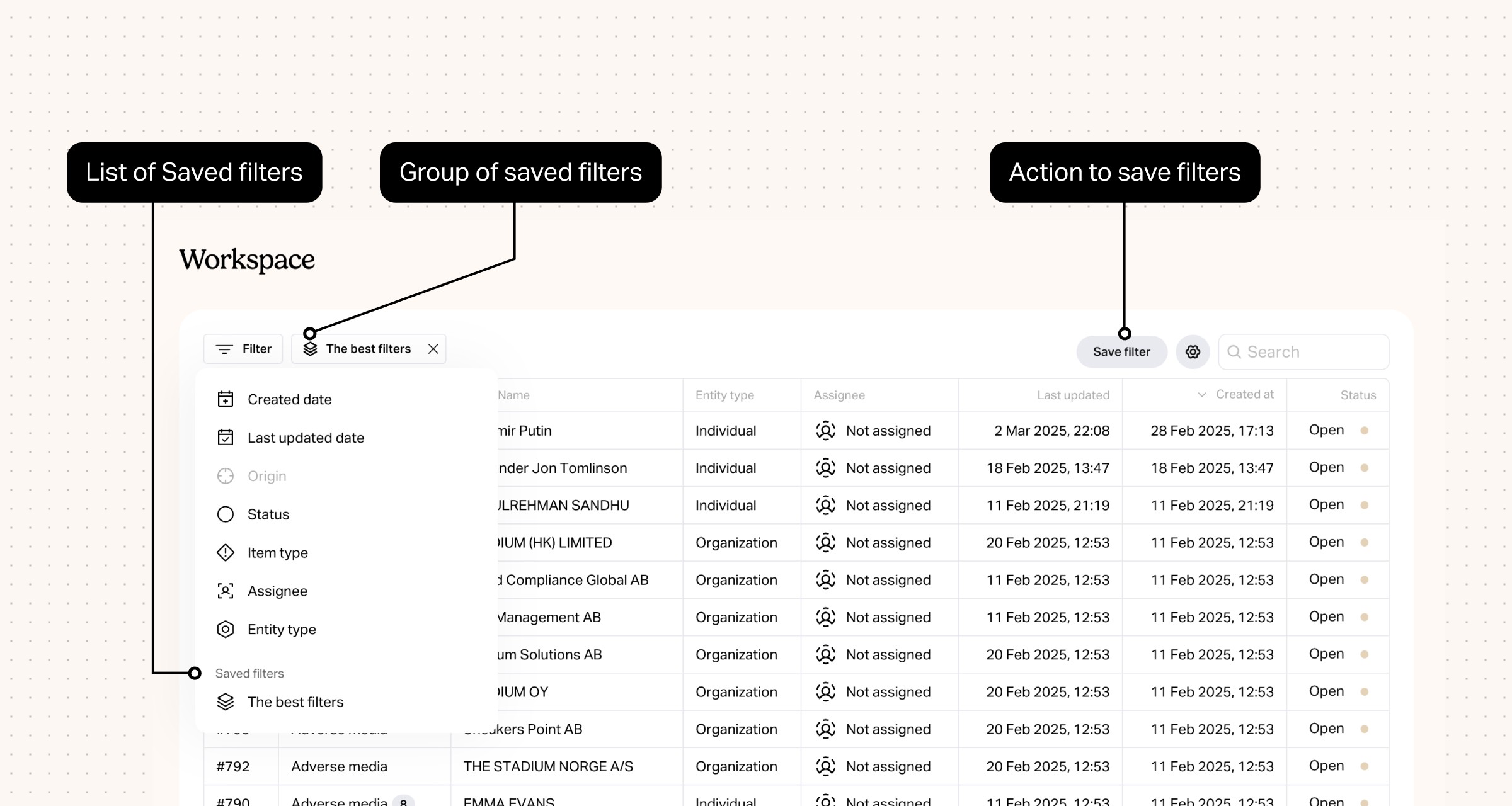
New feature: Save Filters
Now, when you add filters in any table view (e.g., the Workspace page), you’ll see a new "Save Filters" button. Here’s how it works:
Apply your filters.
Click "Save Filters", give your filter group a name, and save.
Next time, just select your saved filters from the "Filters" dropdown—no need to set them up again. You can browse between multiple Saved filters that you create. (And you can always edit or remove saved filter groups as needed.)


Bits raises €12M Series A to unify AML for European fintechs
Bits raises €12M Series A led by Alstin Capital to accelerate product development and help regulated businesses expand across Europe without rebuilding compliance.

Bits Technology partners with Cardlay to deliver enhanced KYC and compliance capabilities
Bits partners with Cardlay to integrate automated KYC and compliance into card spend management, giving finance teams a seamless, regulator-ready experience.

Bits Technology launches automated KYB in Italy
Bits launches automated KYB in Italy, making compliant business onboarding faster and more reliable despite Italy's complex registry data and regulatory environment.